

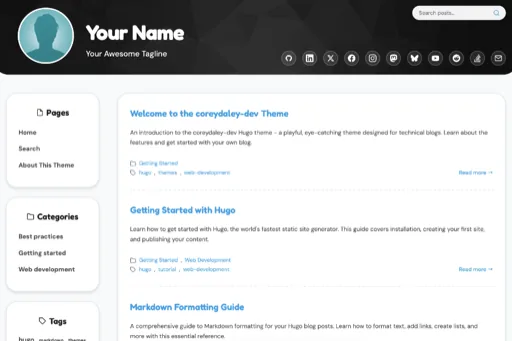
I’m excited to share something I’ve been working on: the Hugo theme powering this site is now open source. After months of iterative development and collaboration with Claude Code, I’ve released the coreydaley-dev theme under the MIT license. You can find it on GitHub at coreydaley/coreydaley-dev-theme and see a live preview at theme.coreydaley.dev .
Why Open Source?
When I started building this blog, I wanted something different from the typical minimalist developer themes. I wanted personality, fun design elements, and modern functionality—but I also wanted to understand every piece of how it worked. Building it with AI assistance (specifically Claude Code) gave me both: a distinctive theme and deep insight into Hugo’s templating system.
Once it was working well for my own site, the question became: why keep it to myself?
Open sourcing the theme made sense for several reasons:
- Giving back to the community - The Hugo ecosystem is filled with open source themes that helped me learn. This is my contribution back.
- Learning in public - Making the code public encourages better documentation and cleaner implementation.
- Enabling others - If someone else wants a fun, cartoony design without the typical flat aesthetic, they can start here.
- Collaboration potential - Others might improve it, fix bugs, or add features I haven’t thought of.
Why the MIT License?
I chose the MIT License because it’s:
- Permissive - Anyone can use, modify, distribute, and even commercialize the theme
- Simple - No complex restrictions or copyleft requirements
- Developer-friendly - It’s the license I’d want if I were using someone else’s theme
- Widely understood - Most developers are familiar with MIT and what it allows
The goal isn’t to maintain strict control over how people use it—it’s to make it as easy as possible for others to benefit from the work.
Key Features
The coreydaley-dev theme isn’t just about aesthetics. It has several practical features that make it genuinely useful:
1. Special Date Avatar Swapping (enableCheckSpecialDate)
This is one of my favorite features. The theme can automatically swap your avatar based on special dates:
- Halloween - Show a pumpkin avatar
- Christmas - Display a festive holiday avatar
- Your birthday - Celebrate with a special image
- Custom dates - Define your own occasions
Enable it in your hugo.toml:
[params]
  enableCheckSpecialDate = true
  avatar = '/images/avatars/avatar.png'
Then create a static/images/avatars/ directory with date-specific images:
avatar-halloween.png(October 31)avatar-christmas.png(December 25)avatar-newyears.png(January 1)- Any custom dates you configure
It’s a small touch, but it makes the site feel alive and responsive to the calendar.
2. Pagefind Search Integration
The theme has built-in support for Pagefind , a fast client-side search library. No server-side indexing required—just add Pagefind to your build process and the theme handles the rest with a clean, accessible search UI.
3. Responsive Design
The theme works smoothly across devices:
- Mobile-first approach with a hamburger menu
- Tablet and desktop layouts that expand gracefully
- Flexible social icons that wrap on smaller screens
- Readable typography at all viewport sizes
4. Taxonomy Support
Full support for Hugo taxonomies:
- Categories for broad topic organization
- Tags for specific keywords
- Tag cloud visualization with weighted sizing
- Sidebar navigation with dedicated sections for Pages, Categories, and Tags
5. Customizable
Extensive customization options via hugo.toml:
- Avatar and cover images
- Social media links (GitHub, LinkedIn, Twitter, Facebook, Email, and more)
- Site tagline and description
- Google Analytics integration
- Custom styling via CSS variables
6. Built with Modern Web Standards
- Semantic HTML for accessibility
- CSS Grid and Flexbox for layouts
- Minimal JavaScript (only where necessary)
- Fast performance - static site generation keeps it blazing fast
The Development Journey
Building this theme was an experiment in AI-assisted development. I worked with Claude Code to:
- Design the initial architecture - Deciding on template structure and feature set
- Iterate rapidly - Making changes, testing locally, refining based on feedback
- Solve complex problems - Like integrating Pagefind and making responsive navigation work smoothly
- Document thoroughly - Writing clear configuration examples and setup instructions
The result is a theme that reflects human creativity guided by AI capabilities. I made the design decisions, set the requirements, and defined the aesthetic—Claude Code helped translate those ideas into working Hugo templates and CSS.
How to Use It
Getting started with the coreydaley-dev theme is straightforward:
1. Clone or Download the Theme
cd your-hugo-site
git clone https://github.com/coreydaley/coreydaley-dev-theme themes/coreydaley-dev
Or add it as a Git submodule:
git submodule add https://github.com/coreydaley/coreydaley-dev-theme themes/coreydaley-dev
2. Configure Your hugo.toml
Set the theme and configure site parameters:
theme = 'coreydaley-dev'

[params]
  avatar = '/images/avatars/avatar.png'
  coverImage = '/images/cover.png'
  description = 'Your site description'
  tagline = 'Your tagline'
  enableCheckSpecialDate = true

[params.social]
  github = 'https://github.com/yourusername'
  linkedin = 'https://linkedin.com/in/yourusername'
  email = 'you@example.com'
3. Add Your Content
Create posts and pages using Hugo commands:
hugo new posts/my-first-post.md
hugo new pages/about.md
4. Run Locally
hugo server -D
Visit http://localhost:1313 to see your site.
5. Optional: Add Pagefind Search
Install Pagefind and add it to your build process:
npm install -D pagefind
hugo --minify
npx pagefind --source "public"
The theme will automatically display the search functionality.
What’s Next?
Now that the theme is open source, I’m curious to see how others use it, modify it, or improve it. Some ideas I’m considering for future development:
- More special date options - More holidays and custom event support
- Additional layout options - Different homepage and archive layouts
- Dark mode - A toggle for light/dark themes
- Accessibility improvements - Enhanced keyboard navigation and screen reader support
- Performance optimizations - Further refinements to load times and resource usage
But I’m also open to contributions. If you have ideas, find bugs, or want to add features, pull requests are welcome.
Why This Matters
Open sourcing a Hugo theme might seem small, but it represents something larger: the democratization of web development through AI assistance and open collaboration.
Building a custom theme used to require deep expertise in templating languages, CSS layout systems, and Hugo’s architecture. Now, with AI tools like Claude Code, developers can learn by doing, iterate rapidly, and create professional-quality results while understanding the underlying code.
By open sourcing the theme, I’m extending that democratization further. Anyone can:
- Use it as-is for their own blog
- Modify it to fit their needs
- Learn from it to understand Hugo theming
- Contribute to it to make it better
Try It Out
If you’re looking for a Hugo theme that:
- Breaks away from minimal flat design
- Offers fun, distinctive aesthetics
- Includes practical features like special date avatars
- Supports modern search functionality
- Comes with full source code and MIT licensing
…then check out coreydaley-dev at:
- GitHub Repository: https://github.com/coreydaley/coreydaley-dev-theme
- Live Preview: https://theme.coreydaley.dev
- This Site: You’re looking at it right now!
I’d love to hear what you think, see what you build with it, or collaborate on improvements.
What features would you most want to see in a Hugo theme? Are there elements from other static site generators you wish Hugo themes supported? Let me know—I’m always looking for ideas!