

I didn’t do that.
The Notion Problem
I’d been using Notion for a couple of years — notes, project tracking, research. When Notion launched Notion AI, I took a look. But here’s the thing: I was already paying for Claude. And Codex. And a couple of other AI services I actually use and have opinions about.
The deeper issue wasn’t price. It was operational fragmentation. My workflow had become a treadmill:
- Write ideas in Notion
- Copy context into a browser tab
- Ask an AI agent for help
- Copy results back manually
- Repeat until the thread of thought was gone
Notion AI would have solved exactly none of that. It’s Notion’s AI — not a bridge to the services I’d already invested in. You don’t get to swap models, point it at a self-hosted endpoint, or plug in the Anthropic API key you’re already paying for. One vendor’s AI baked into one vendor’s product.
My choices were: accept it, ignore it, or leave.
I left.
Enter Obsidian
Obsidian was the obvious move. Local-first, Markdown-native, plugin ecosystem that doesn’t lock you into one vendor path. If you care about owning your notes and evolving your workflow over time, those properties matter a lot.
But after switching, I found the specific integration I wanted didn’t exist. I searched for a sidebar where I could open a chat with one of my existing AI agents, share context from my current note, and have it write changes back to my vault. I found partial solutions — plugins covering a single provider, others requiring complex setup. None gave me the multi-agent, multi-mode experience I had in mind.
The gap was real. So I built it.
What I Built
The Obsidian AI Agent Sidebar plugin is what I wish had already existed. It adds a sidebar panel to Obsidian where you can chat with multiple AI agents and give them direct access to your vault. A few design decisions shaped how it works:
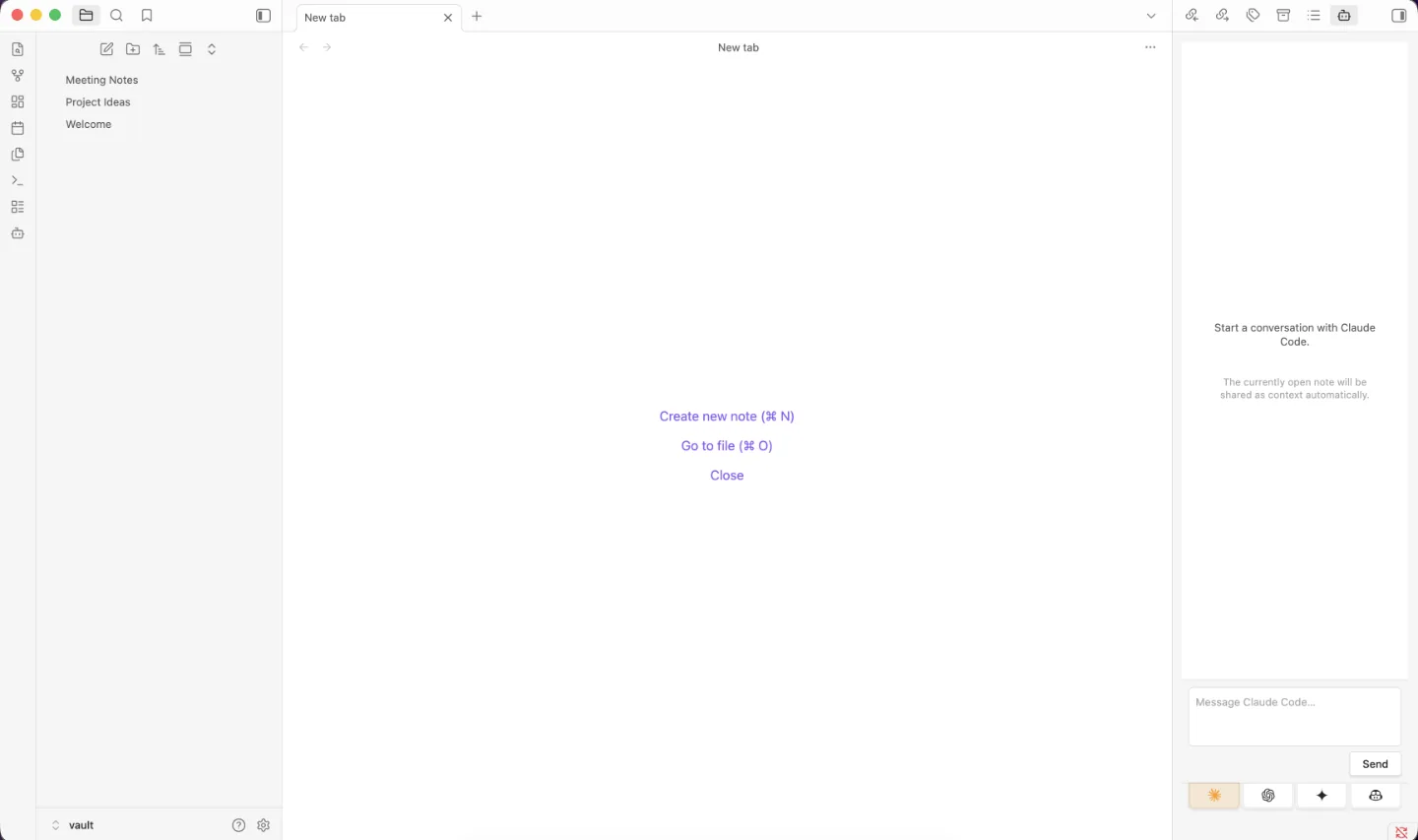
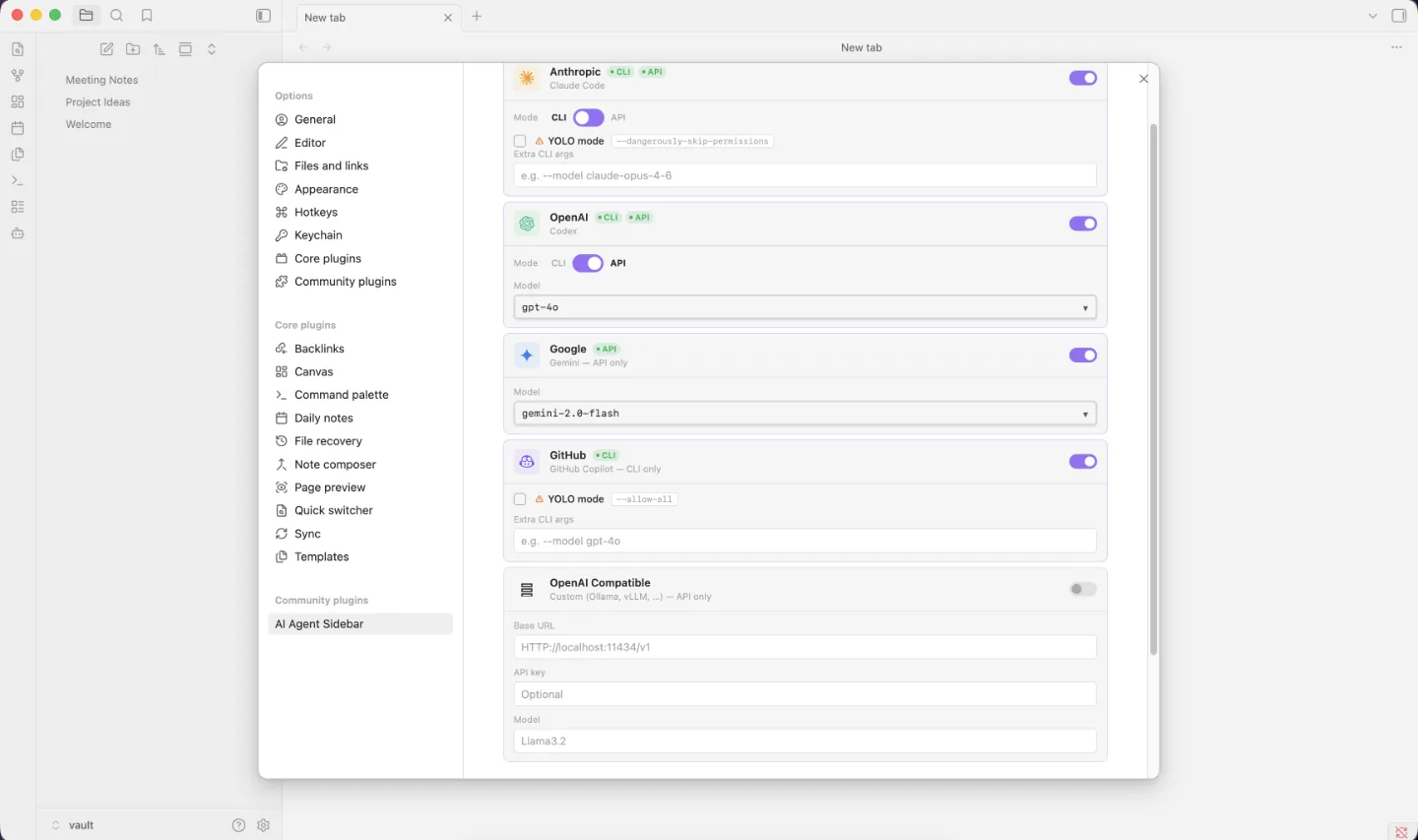
1. Multi-agent tabs, not a single chat. Different models are better at different tasks. The tabbed interface lets you switch between Claude Code, OpenAI Codex, Google Gemini, GitHub Copilot, and any OpenAI-compatible endpoint — without losing conversation history in other tabs.
2. CLI mode and API mode. Some agents are best consumed through their official CLIs, using credentials you’ve already configured in your shell. Others work better through direct API calls. The plugin supports both, which means it adapts to your existing setup rather than forcing a migration.
3. Real vault operations with guardrails. The plugin can read, write, create, edit, rename, and delete files in your vault. Paths are validated against the vault root to prevent directory traversal, and destructive operations require explicit confirmation. Your currently open note is automatically shared as context. When you ask an agent to rewrite a section, it can do it directly — not suggest a revision you have to paste in by hand.
4. OpenAI-compatible endpoint support. Any provider that speaks the OpenAI protocol — Ollama, vLLM, self-hosted gateways — can be plugged in. This keeps the tool useful beyond the current landscape of commercial APIs.
There’s also real-time streaming responses, conversation persistence across sessions, model selection in API mode, and a debug mode that shows raw output when something breaks.
How I Built It (With AI, Obviously)
The development process matched the tool’s philosophy: I used Claude and Codex as active participants throughout, following the dark factory method — a structured approach to agentic software development where AI handles implementation details while you stay at the level of architecture and intent.
The loop was: define behavior, generate candidates, review output, reject what’s weak, keep what works, iterate. One concrete example: the vault file operation boundaries took several passes to get right. The first version was too permissive; agents could traverse paths outside the vault root. I described the constraint, both models proposed different validation approaches, and the final implementation pulled from both — strict path checking from one, cleaner error messaging from the other.
Working with Claude and Codex in parallel consistently produced better results than either alone, in my experience. They have different strengths and different blind spots. The tradeoff worth naming: agentic development with insufficient review produces demos that don’t hold up under real use. The leverage is real, and so are the failure modes.
Current Limitations
Worth naming what the plugin doesn’t do:
- Desktop only. Obsidian mobile isn’t supported.
- CLI mode has broad filesystem access. The plugin only sandboxes vault paths in API mode. In CLI mode, agents have the permissions of your shell. Only use CLI mode with agents you trust.
- No built-in internet access. The agents can read and write your vault, but browsing the web requires your AI provider to support it natively.
- Privacy boundary. Don’t use this with notes containing sensitive or PII data unless you’re comfortable with that content being transmitted to whichever AI provider you’ve configured.
Why Open Source
The plugin is MIT-licensed, and I don’t have particularly noble reasons for that. I built it to scratch my own itch. Scratching your own itch in public is just open source. I’d also benefited enough from other people’s Obsidian plugins that it felt right to put this one back.
The practical case for open source here is that my setup isn’t yours. I made sure the agents I use most are well-supported. If you’re on a different stack, you know your environment better than I do. The code is there.
The Larger Point
Each decision in this story was straightforward given the constraints. I didn’t want to add a subscription for functionality I already had. I switched to a tool that gave me more control. I built the integration that was missing.
What made it possible to actually ship — rather than just plan — was combining agentic engineering with a disciplined review process. The agents handled implementation details. I stayed at the level of architecture and intent, made the calls that mattered, and kept the direction coherent. That’s a different kind of development work, and it’s faster when you get it right.
The result is a plugin I use every day, built mostly by AI agents, that lets me use AI agents inside Obsidian. There’s something satisfying about that loop.
If you’re paying for AI subscriptions you can’t actually use inside your primary writing and thinking tool, what’s stopping you from building the integration yourself?